Build, resell or white-label: choosing a panic app
Three ways to put a safety app in your subscribers’ hands, what each really costs you, and twelve questions to ask any platform before you sign.

Sooner or later every response company is asked the same question by a subscriber: do you have an app? There are three honest ways to answer yes. You can build one, you can send subscribers to someone else’s, or you can run an existing platform under your own name. Each works for some companies and fails others, and the difference is rarely the feature list.
The short version
- Building your own app means owning a software product: two app stores, background location, reliable alerts, a control room portal and constant maintenance as phones change.
- Reselling a third-party app is quick, but your subscribers learn somebody else’s brand and your relationship lives inside their product.
- White-labelling gives you a working platform under your own name, at the cost of depending on a vendor. Choose the vendor carefully.
- The questions that matter most are about the control room: where alerts land, what the operator sees, and what is recorded.
- Ask about data before price: whose it is, where it is stored, who can see it and what happens if you leave.
Three ways to say yes
From the subscriber’s side, the three routes look alike. Each puts a panic button and some safety features on a phone. The differences sit behind the screen: who owns the software, whose name the subscriber sees, where the alerts go, and who carries the risk when something breaks.
| Build your own | Resell another app | White-label a platform | |
|---|---|---|---|
| Brand the subscriber sees | Yours | The app maker’s | Yours |
| Time to launch | Longest | Shortest | Short, depending on setup |
| Upfront cost | Highest | Lowest | In between |
| Ongoing maintenance | Entirely yours | The app maker’s | The platform’s |
| Control room | You build or buy one | Depends on the app | Included, under your brand |
| Subscriber data | Yours to protect | Held by the app maker | Held for you, separate from other companies |
| Biggest risk | Cost and reliability | Losing the relationship | Choosing the wrong vendor |
What building your own really involves
Building an app sounds like a one-off project. It is not. A safety app is a live system that has to work at three in the morning on a phone with four percent battery and one bar of signal, and it has to keep working as Android and iOS change underneath it every year.
The app itself is the smaller part of the job. Behind it you need a server that receives alerts reliably, a control room portal operators can use under pressure, user accounts and permissions, secure storage for sensitive information such as medical details, and a record of who did what. Then come app store reviews, background location permissions that both platforms restrict more tightly every year, and the support load when subscribers cannot log in.
For a large company with its own development team, owning all of that can make sense. For most response companies, it means becoming a software business in order to stay a security business.
- Apps for Android and iOS, kept current with every operating system update.
- Reliable alert delivery, including when the app is closed or the phone is locked.
- Background location that survives battery optimisation and permission changes.
- A control room portal built for operators working under pressure.
- Secure storage, access control and an audit trail for sensitive subscriber data.
- Support, fixes and app store compliance, indefinitely.
Sending subscribers to someone else’s app
The quickest route is to recommend or resell an existing consumer safety app. Subscribers can be using it within days, and the maintenance is somebody else’s problem.
The cost is quieter. Every time a subscriber opens the app, they see another company’s brand. If that app also offers its own response network, family tracking and support, you have introduced your subscribers to a business that may one day compete with you for them. And the information they enter, from their address to their medical details, sits in a product you do not control.
Before choosing this route, find out who receives the alert when a subscriber presses panic. If the answer is not your control room, the app is not part of your service. It is a separate service your subscribers happen to use.
WSN note:Ask one question of any third-party app: when my subscriber presses panic, whose control room sees it first?
Running a platform under your own name
White-labelling sits between the two. The platform already exists and is maintained by its maker, but your subscribers, operators and administrators only ever deal with your brand. The app carries your name and logo, your control room runs the incident workflow, and the relationship stays yours.
The trade-off is dependency. You are relying on another company’s software for something that matters a great deal, so the vendor has to earn that trust. The questions in the next section are designed to find out whether it has.
With WSN Guardian, a partner company gets the subscriber app, the control room and the admin portal, each carrying its own brand. The screenshots on this site show the platform under a demo partner brand, so you can see exactly what that looks like.
Twelve questions to ask any platform
Feature lists all look alike. These questions get underneath them. Ask them of any vendor, including us, and be wary of vague answers.
- 01When a subscriber presses panic, where does the alert land in my control room, and how is the operator alerted?
- 02What exactly does the operator see: location, address, a photo, medical details, vehicle details?
- 03Can operators dispatch a team, update the subscriber and record notes from the same screen?
- 04Is there a silent alert, and what does the subscriber’s phone show while it is active?
- 05What happens when a subscriber raises an alert outside my service area?
- 06How does the app behave with poor signal, or when the phone is locked?
- 07Is my subscribers’ data kept separate from every other company on the platform?
- 08Who can see medical information, and how is access split between administrators and operators?
- 09Is every operator action recorded, and can I export that record?
- 10Where is the data stored, and what will our agreement say about protecting it under POPIA?
- 11Who supports subscribers when the app does not work as they expect?
- 12If we leave, what happens to our subscribers’ data?
WSN note:The best answer to the last question is a clear one. A vendor confident in its product should be comfortable telling you how you would leave.
How Guardian answers the control room questions
Because the control room questions matter most, here is how Guardian handles them. Alerts arrive in a live, colour-coded incident feed. Panic, medical and fire alerts sound an audio alarm that keeps going until an operator acknowledges the incident. The operator sees the subscriber’s position on the map, with street view and aerial view, alongside a verified photo, the critical medical record and emergency contacts.
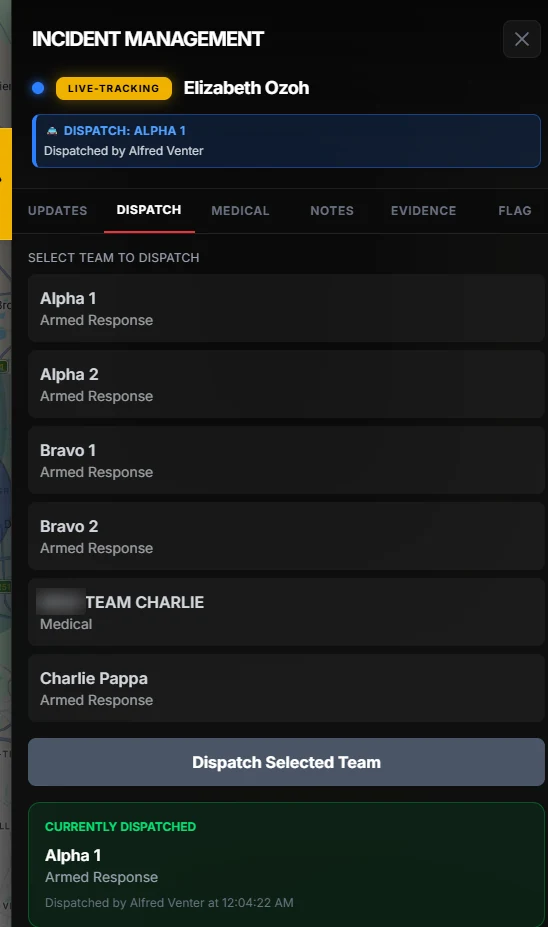
From the incident, an operator dispatches a team, adds notes, reviews evidence, and can flag a client with a warning every other operator will see. Ghost Panic alerts are marked as silent, with an instruction not to call or message the subscriber. Afterwards, each action sits in the incident history and in an audit trail that can be filtered and exported.
On data, each partner’s subscribers are kept separate from every other partner’s, and administrators and operators have different levels of access.
Common questions
How long does it take to launch a white-labelled app?
It depends on how the platform will sit alongside your existing control room and how much branding you need. The first step is a conversation about your setup.
Do subscribers need any special hardware?
No. Guardian runs on the subscriber’s own phone, and your operators work in the Guardian control room portal.
Can we keep our existing control room software?
Yes. Guardian’s control room is its own portal, so it can run alongside the system you already use. Talk to us about how alerts should reach your operators.
Is a white-labelled app cheaper than building one?
Usually, at the start: you avoid the cost of building apps, servers and a portal. The fair comparison is over several years, including the maintenance you would otherwise carry yourself.